SAAS PRODUCT · 2026 · MOTION DESIGN TOOLS
AE Organizer
Manual cleanup, down to one upload.
A SaaS that automates the tedious cleanup of an After Effects project. We built the whole thing: an engine that runs After Effects unattended on a server, a standard each studio defines for itself, credit-based billing, and the team and version-management layer around it.
// 01 · THE SITUATION
Every studio has a standard. Almost nobody follows it.
Every motion design studio has a written standard for how an After Effects project should be organized: color labels by layer type, a set folder structure, pre-comps split from main comps, comps trimmed to length, the render queue cleared. Almost nobody follows it, because doing it by hand eats real time on every file, a few minutes on a simple one and hours on a heavy one, all of it work nobody sees and nobody bills for.
Automating it is the obvious fix, and the reason it hadn't been done is that After Effects fights automation at every turn: no command line, no unattended mode, and scripting that assumes a person is at the screen to click through whatever pops up. Solving that was the first question. Turning it into a product a studio could adopt and pay for was the rest of the work. The specifics were particular to motion design. That second problem never is.
// 02 · WHAT WE BUILT
More than a cleanup tool. A system a studio runs on.
We didn't hardcode what “organized” means.
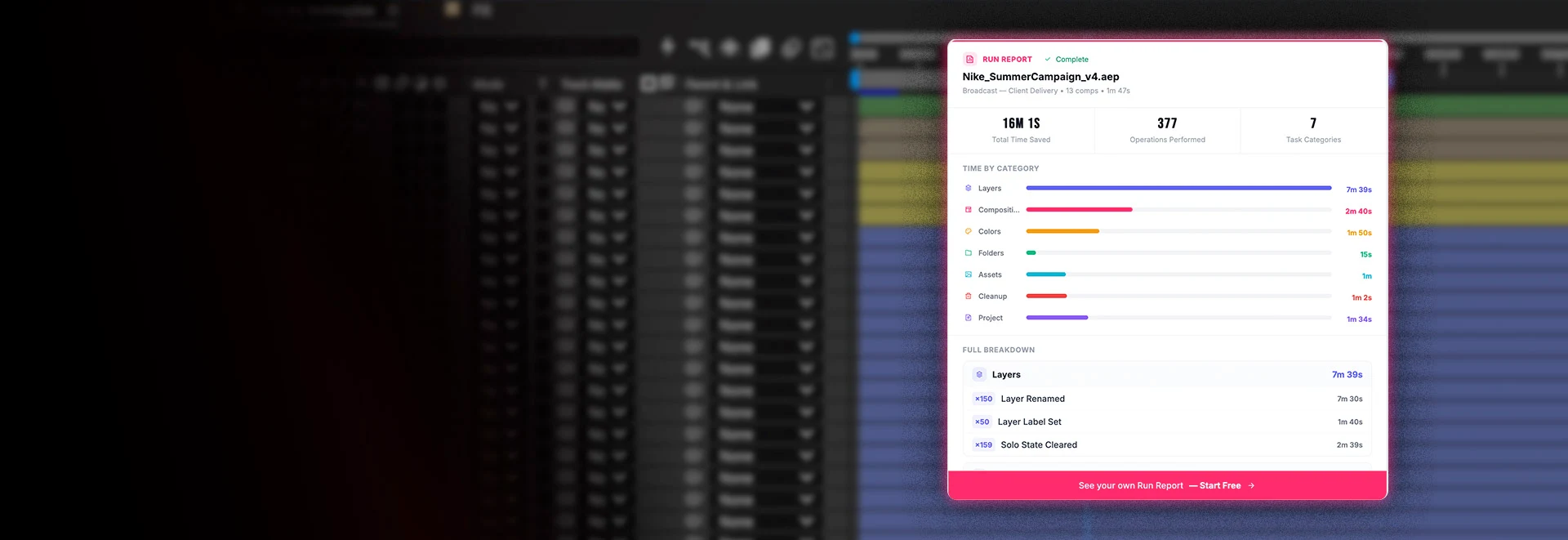
Every studio's definition of a clean project differs, so we built it as a configuration rather than a fixed rule set. Each team defines its own standard, color labels by layer type, folder structure, pre-comp splitting, frame-rate matching, comp trimming, layer collapsing, and render-queue clearing, and the tool applies all of it in one pass. On one real project file, that was 377 separate operations.
Teams keep as many standards as they need, one per client or per project type, lock the ones that can't change, and set a default for every upload. That is the line between a script that does one thing and a product any studio can adopt.
It prices the job before it spends your money.
Before anything is charged, the system reads the project, counts its compositions, and shows a credit estimate up front, so there are no surprises. Billing runs on credits, one per composition, on plan tiers where the more you buy the less each one costs.
And if a job fails, it costs nothing. Nobody is charged for cleanup that didn't finish, and they can simply run it again. For a team spending real money on a tool, knowing the price before it commits and never paying for a miss is the difference between trying it once and standing on it every day.
Your files come back in the After Effects you actually run.
Studios standardize on a version and stay there, because a project silently upgraded is a project that might not open the same way again. So the architecture pins every job to a specific After Effects release, with a dedicated machine image per version, across the range Adobe ships. A studio on 25.6 gets its files back on 25.6, and a team that wants to move up to a particular newer version can send them there on purpose.
It is the kind of detail only someone who has lived in a studio's version anxiety would think to build, and it was designed in from the start rather than bolted on.
The report a producer can take to a budget meeting.
Every job produces a record of what it changed and how much manual work it stood in for, and those roll up across a team against an hourly rate you set, turning cleanup into a dollar figure. Cleanup has always been invisible labor: nobody logs it, nobody bills it, nobody could say what it cost. Now a studio can.
This is the part that earns the renewal. A tool that works gets used; a tool that can show what it saved gets budgeted for next year.
// 03 · THE HARD PART
We made After Effects run with nobody in the room.
After Effects was never meant to run without a person. No command line, no unattended mode, and scripting that assumes someone is at the screen to handle whatever pops up. Making it run untouched on a server meant building everything a person would otherwise do.
We didn't fix the freeze. We moved it somewhere it doesn't matter. After Effects locks up while it works, and that freeze is baked into Adobe's runtime, not something anyone outside Adobe can fix. So instead of fighting it, we moved the whole job onto servers, where it still happens on every file and no human is ever sitting through it. Knowing which problems to relocate instead of solve is most of the work.
It answers dialogs it has never seen. After Effects interrupts constantly, always expecting a human: missing footage, a missing font, an error to acknowledge, "save changes before closing?" We didn't try to catalog every dialog it can throw, because Adobe can add a new one in any release. Instead the watcher catches any dialog window After Effects opens and clicks the safe way through, "OK," "Yes," "Continue with known issues," so the one thing that stalls an unattended run, a window sitting there waiting for a click, never gets its chance, even the first time a dialog it has never seen appears.
The pipeline runs itself, and watches itself. An upload starts a chain that needs no conductor: the file lands, a function sizes and queues it, a waiting machine runs the cleanup and writes the result back, and that write triggers the notice to the user. No central controller sits in the middle, so one stuck job can't freeze the rest, and a separate layer watches every job from off the machine doing the work, so a failure gets caught even when the machine that hit it is too far gone to report its own trouble.
The result is a desktop creative application behaving like a service. A project is uploaded and the person walks away. A machine opens After Effects, organizes the file, sends it back, and stands down, and the software never knows there was nobody in the room.
// 04 · THE NUMBERS
The work it removed. The cost it didn't add.
377
operations run on one real project file
16 min
of hand cleanup saved on that file
0
machines running when the queue is empty
// 05 · THE STACK
Why these choices.
Security and data handling were decisions, not defaults. Uploads and public assets live in separate storage with separate permissions, file retention is controlled in the database rather than left to storage defaults, commands run over AWS Systems Manager so no machine ever exposes an open port, and deploys use short-lived federated credentials instead of long-lived keys, with tests that must pass before anything reaches production.
Django and React, joined by Inertia. The app behaves like a single-page application without a separate API to build and maintain behind it: no token handling, no CORS, no second copy of the auth logic to keep in step. One codebase, one source of truth.
The server runs async, because the product is live. A job takes minutes and the user is watching a status move, so updates push to the browser at every stage rather than making anyone refresh.
Processing runs in Lambda, not on the web server. Intake, orchestration, and completion are separate functions with a queue between them, so a spike of uploads never touches the thing serving the site.
The worker fleet has no database. State lives in the tags on the machines themselves, which removes a whole tier of infrastructure that would otherwise need to be paid for, backed up, and kept in sync.
Machines run on spare-capacity pricing and scale to zero. Compute is the real cost here, so capacity follows demand: machines start when files are waiting, grow with the queue, and stand down when it clears, with one kept warm so the first file of the day still starts fast.
// NEXT CASE STUDY
Ruska Roma// START HERE
TELL US WHAT
YOU'RE BUILDING.
Twenty minutes with a senior engineer, and you'll leave with how we'd build it, roughly what it takes, and what we'd worry about first. We read every message ourselves and reply within one business day.
A rough idea is enough to start.
That's in front of us now.
You'll hear back within one business day, from an engineer rather than a form letter. Nothing else needed on your end.
Or just email us at hello@queencity.io