Adobe plugin and extension development.
Custom panels, automation, and plugins for After Effects, Premiere, Photoshop, and the rest of the Adobe apps your team lives in. Hand us the task your artists dread. We’ll turn it into one click, or move it onto a server so it runs overnight with nobody at the keyboard.
// 01 · WHAT WE BUILD
TOOLS THAT LIVE INSIDE THE APPS YOUR TEAM ALREADY USES.
We build UXP and CEP extensions for any Creative Cloud app. We start with the part of the job that costs your team the most hours, take it off their plate, and add the things the app can’t do on its own.
New abilities for the app.
Features Adobe never built: AI models working right inside the app, texture and material maps generated from a single image, or a link to a 3D or data engine that lets your team make work the app couldn’t make before.
One template, hundreds of versions.
Feed in a spreadsheet, a product feed, or a list of languages, and get back every version, built the same way, ready to check and deliver.
Your pipeline, without the hand-offs.
Assets pulled from your library, finished work sent for review, and your project tracker updated, without anyone downloading, renaming, or uploading by hand.
Plugins you can sell.
A plugin built to go on sale, with the installers, licensing, trials, and payments a paying customer expects. More on that below.
// 02 · CEP TO UXP
MOVE YOUR CEP PANEL TO UXP
ON YOUR SCHEDULE.
Adobe is moving its apps from CEP, the older way to build panels, to UXP. Photoshop and Premiere already run UXP plugins, and After Effects still runs CEP for now. UXP panels are lighter on your computer, because every CEP panel runs its own copy of a web browser inside the app. Adobe has also said CEP will eventually be removed, so moving early lets you pick the timing, test the new version while the old one still works, and switch when it suits your team.
Moving over is a rewrite, not a copy and paste. The two platforms work differently, and some of what a CEP panel does needs a new approach in UXP. We start by going through the panel you have, tell you what can move now and what should wait, and rebuild it so it looks and works the way your team is used to. Where it helps, both versions can run side by side until everyone has switched.
// 03 · ADOBE APPS ON A SERVER
YOUR ADOBE WORK,
DONE WITH NOBODY AT THE KEYBOARD.
Some jobs are too big for one artist at one machine: thousands of versions of one template, a nightly batch of exports, every project in an archive checked before delivery. We move that work onto servers. Your systems send a job through an API, a machine opens the project in the Adobe app, does the work, and sends the result back. Where Adobe offers its own cloud tools, such as its APIs for Photoshop and InDesign, we build on those. Where it doesn’t, as with After Effects, we run the desktop app itself on the server.
It doesn’t stop for pop-ups. Adobe apps expect a person to click through warnings about missing fonts, missing footage, and unsaved changes. Ours answers them automatically, including ones it has never seen before.
A stuck job gets caught. Every job is watched from outside the machine running it. If one stalls, the app is restarted and the job is flagged, so one bad file doesn’t hold up the rest.
It runs on your setup. Each job runs on the app version it needs, with your plugins and fonts installed, in your own cloud account, so your files stay with you.
You pay for the work, not the wait. Machines start when jobs arrive and shut down when the queue is empty, so you aren’t paying for servers that sit idle.
// 04 · BUILT TO SHIP
EVERYTHING BETWEEN A WORKING PLUGIN AND THE PEOPLE WHO USE IT.
Whether it’s going onto every machine in your studio or on sale to the world, a plugin has to install cleanly, stay in the right hands, and keep up with every update. We build all of it.
Installers that just work
Signed for Mac and Windows, with the Mac installer notarized by Apple, so it installs without security warnings. A customer double-clicks and it works. For a studio, it’s packaged so your IT team can push it to every machine with tools like Jamf or Intune.
The right people, and only them
Sell it, and each purchase covers a set number of machines, which customers can move to a new computer on their own. Keep it in-house, and access is tied to your team’s accounts, so when someone leaves, the plugin leaves with them.
Protected code
Whether it’s your product or your studio’s secret weapon, it shouldn’t be easy to copy. We compile and scramble the code before it ships, so opening the files doesn’t hand anyone your work.
Updates that reach everyone
When Adobe updates its apps or you add a feature, the new version reaches every customer or every artist, so nobody is left on an old one that no longer works.
Free trials, your way
If you’re selling it, a trial lets people try it on their own projects first. Limit it by days, by uses, or by features, whatever fits. When they buy, the plugin they already have simply unlocks, with nothing to download or reinstall.
Payments and storefront
Customers buy on your site, get their license right away, and manage their own machines and downloads. Payments run through a provider like Stripe, so the money goes straight to you. Want it on Adobe’s marketplace too? We prepare the listing.
// 05 · PROOF
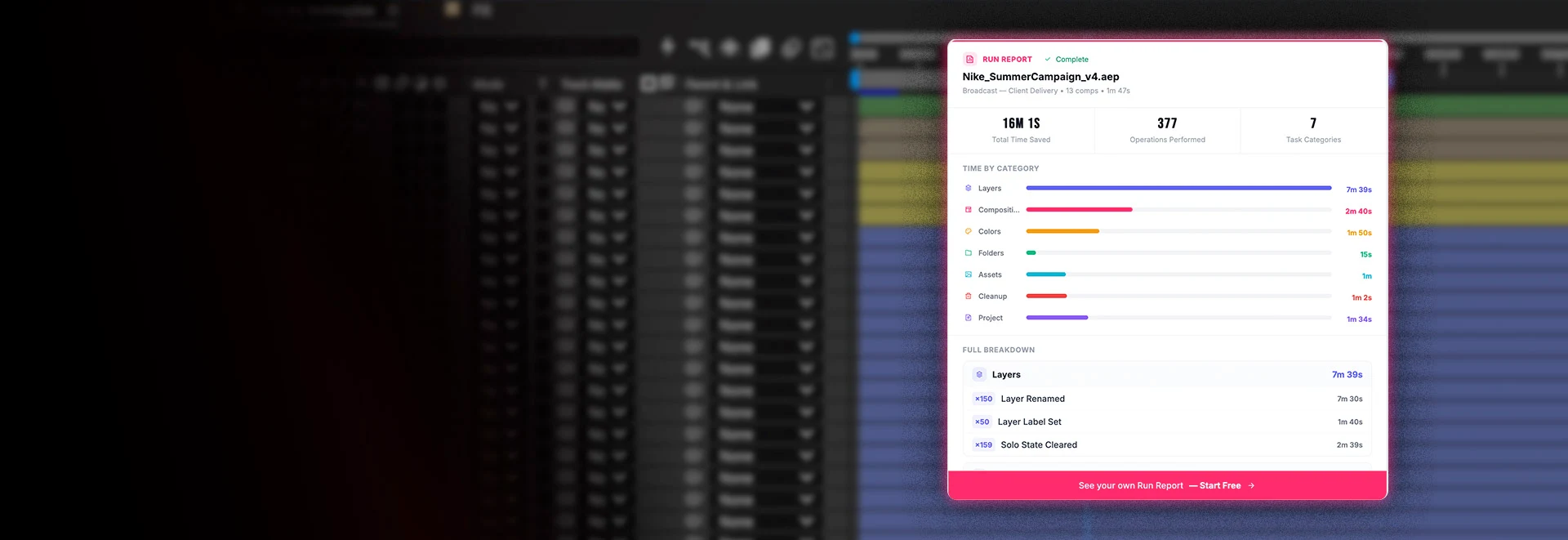
FROM A PANEL PEOPLE BOUGHT
TO A SERVICE THAT RUNS ITSELF.
// 06 · FAQ
COMMON QUESTIONS.
Which Adobe apps can you build for?
Any of them. We build UXP and CEP extensions and scripts for the Creative Cloud apps, including After Effects, Premiere, Photoshop, Illustrator, and InDesign. If your team works in it, we can build inside it.
Will it work on Mac and Windows?
Yes. We build and test for both, including Apple Silicon Macs.
What happens when Adobe updates the app?
Adobe ships updates often, and now and then one breaks a plugin. If that happens in the sixty days of support that come with every project, we fix it at no charge. After that, we’re available on a support contract, which can include testing your plugin against Adobe’s beta releases so problems are caught before your team updates.
Do our files have to leave our building?
Not for a plugin: it runs on your own machines. For server work, the servers can live in your own cloud account, so your projects stay under your control.
Can you get it listed on the Adobe marketplace?
Yes. We package it to Adobe’s requirements and prepare the Adobe Exchange listing, or set it up to sell directly from your own site.
Are we allowed to run Adobe apps on a server?
It depends on the app and your Adobe plan, and Adobe’s terms differ between them. We check them for your setup before we build, and use Adobe’s own cloud APIs where they fit the job.
How much will it cost?
It depends mostly on what kind of build it is. A script that handles one task is the smallest job. A panel connected to your systems, a plugin built to sell, and a server pipeline each take more, and supporting several Adobe apps, or several versions of one, adds to it. You get the price in the proposal before any work starts.
// START HERE
TELL US WHAT
YOU'RE BUILDING.
Twenty minutes with a senior engineer, and you'll leave with how we'd build it, roughly what it takes, and what we'd worry about first. We read every message ourselves and reply within one business day.
A rough idea is enough to start.
That's in front of us now.
You'll hear back within one business day, from an engineer rather than a form letter. Nothing else needed on your end.
Or just email us at hello@queencity.io